

MCP Explained: How AI Connects Securely to Your Tools
Model Context Protocol helps AI connect with email, calendars, documents, databases, registration platforms, and business software. Learn how schools and businesses can use MCP with controlled permissions, human approval, and secure workflows.
Artificial intelligence becomes much more useful when it can do more than generate text.
Schools and businesses want AI systems that can search documents, check calendars, review registration information, access databases, draft emails, and work with the software employees already use.
The challenge is connecting AI to all those different systems safely and consistently.
That is where MCP can help.
MCP stands for Model Context Protocol. It provides a structured way for AI applications to connect with external tools, systems, and information sources.
A simple way to think about MCP is:
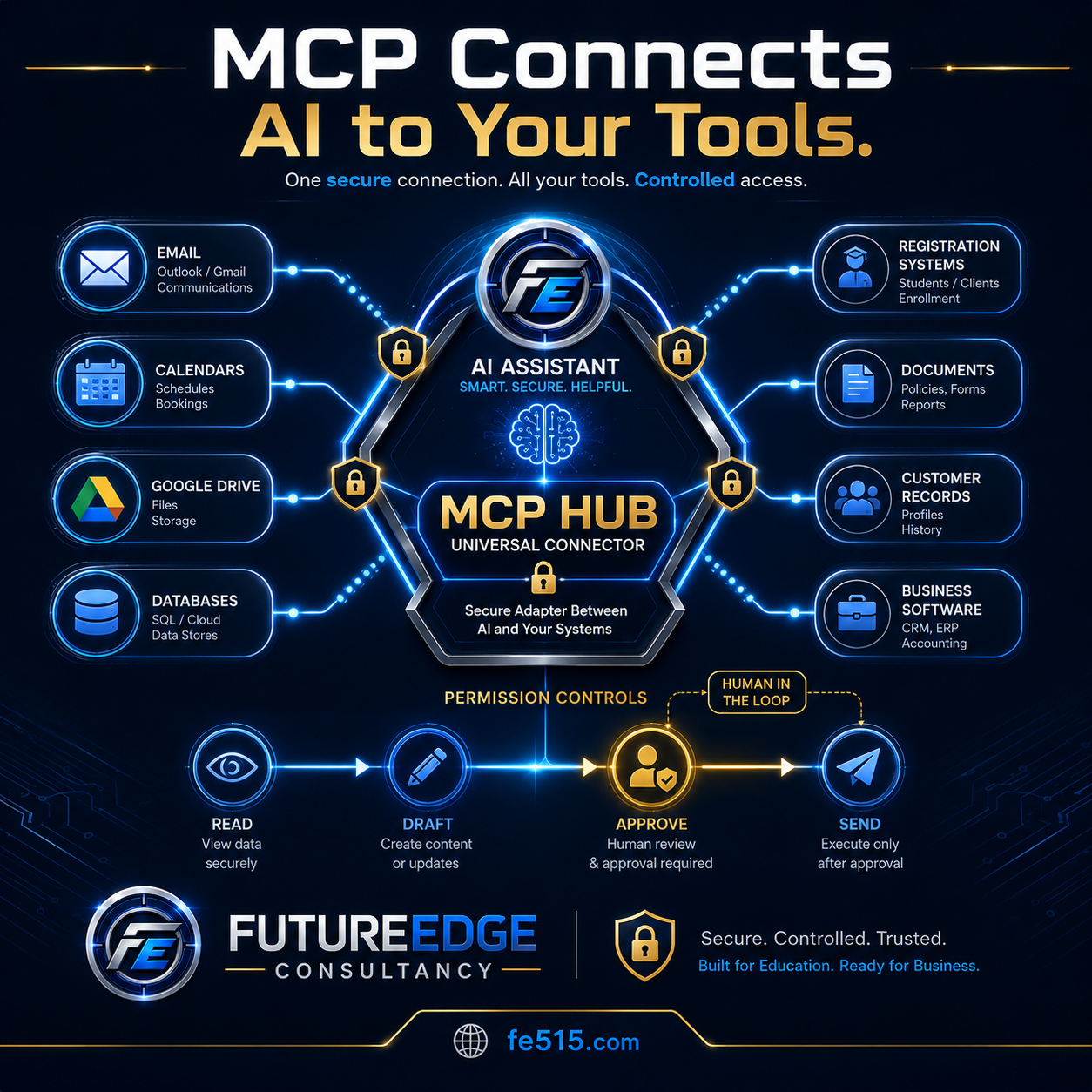
MCP acts like a universal adapter between AI and the tools an organization already uses.
What is MCP?
Model Context Protocol is a standard that helps AI applications communicate with outside systems.
Those systems might include:
Email
Calendars
Google Drive
Microsoft 365
Databases
Registration platforms
Customer records
Accounting software
Project-management systems
Document repositories
Internal business applications
Without a shared connection method, developers may need to build a separate custom integration for every AI model and every software platform.
MCP creates a more consistent structure for telling an AI system:
What tools are available
What information those tools can access
What actions they can perform
What permissions are required
When human approval is needed
MCP does not automatically make every connection secure. Organizations still need authentication, access controls, logging, testing, and thoughtful system design.
Why AI needs access to real tools
A chatbot can provide information, but it usually cannot complete a real organizational workflow by itself.
For example, a chatbot might help write an email.
A connected AI assistant could potentially:
Search the correct policy.
Review related records.
Check the employee’s calendar.
Draft the email.
create a follow-up task.
Present the proposed actions for approval.
Send the message only after a person authorizes it.
The value comes from connecting AI to the systems where work already happens.
How an MCP connection works
The basic process can be explained in four parts.
1. The AI receives a request
A user asks the AI assistant to complete a task.
For example:
“Find the classes beginning next week that have not reached minimum enrollment.”
2. The AI identifies the tools it needs
The assistant may need access to:
Registration data
Class schedules
Instructor agreements
Room reservations
Email
Calendar information
3. The AI uses approved tools
The system retrieves only the information it is permitted to access.
It may be allowed to read registration data and draft emails but not cancel a class or send messages without approval.
4. A person reviews sensitive actions
Before the AI changes records, sends communications, authorizes money, or makes a high-impact decision, the system pauses for human review.
This keeps the person responsible for the final action.
How schools can use MCP
Schools rely on many disconnected systems.
A district employee may use separate platforms for:
Student information
Email
Calendars
Board policies
Employee records
Facility reservations
Registration
Transportation
Athletics
Help-desk requests
Document storage
An AI assistant connected through controlled tools could help employees move information between those systems more efficiently.
School example: Community Education enrollment review
A Community Education manager could ask:
“Review next month’s classes and identify any that may need to be canceled or combined.”
The AI assistant could:
Read current enrollment numbers.
Compare enrollment with minimum class requirements.
Review instructor agreements.
Check available rooms and alternative dates.
Calculate the financial impact.
Draft instructor and participant messages.
Present cancellation or consolidation options.
Wait for manager approval.
Send approved messages.
Update the class status and calendar.
This is more than a chatbot response. It is a connected workflow involving several approved systems.
Other school applications
MCP-connected assistants could support:
Administrative meeting preparation
Policy and handbook research
Parent communication drafts
Facility scheduling
Athletic eligibility workflows
Employee onboarding
Help-desk requests
Student support documentation
Calendar coordination
Community program registration
Important educational decisions should still remain under human control.
How businesses can use MCP
Businesses also depend on many different systems.
An employee may need information from:
Customer relationship management software
Accounting
Contracts
Email
Calendars
Project-management tools
Inventory
Support tickets
Human resources
Document storage
MCP can help an AI assistant work across those systems through defined and controlled tools.
Business example: Customer meeting preparation
An employee could ask:
“Prepare me for tomorrow’s meeting with this customer.”
The AI assistant could:
Retrieve the customer profile.
Review recent emails.
Summarize open support issues.
Locate the current contract.
Review outstanding invoices.
Identify upcoming renewal dates.
Check the meeting time and attendees.
Create a briefing document.
Draft follow-up questions.
Wait for approval before sending anything.
The employee receives a useful briefing without manually searching several platforms.
Other business applications
MCP-connected systems could support:
Sales preparation
Customer-service workflows
Contract review
Invoice follow-up
Employee onboarding
Proposal development
Inventory checks
Meeting scheduling
Project updates
Compliance documentation
Permission controls are essential
The ability to connect AI to organizational tools creates significant responsibility.
An organization should clearly define what the AI can do.
A practical permission model might include four levels.
Read
The AI can view approved information.
Examples:
Read a policy
Review a calendar
Search a contract
View registration numbers
Retrieve a customer record
Draft
The AI can prepare content or proposed changes.
Examples:
Draft an email
Prepare a report
Create a calendar invitation
Suggest a database update
Prepare an invoice
Approve
A person reviews the proposed action.
Examples:
Approve an email
Confirm a refund
Review a schedule change
Authorize a record update
Approve a customer response
Send or execute
The system completes the action only after approval.
Examples:
Send the email
Update the calendar
Change a registration
Create the support ticket
Submit the approved record
This approach keeps people involved in actions that affect students, employees, customers, finances, or legal responsibilities.
What should always require human approval?
Organizations should consider requiring human approval before an AI system:
Sends external communication
Changes student or employee records
Approves or denies a request
Authorizes payment
Issues a refund
Cancels a class or event
Changes a contract
Makes an employment decision
Assigns discipline
Deletes records
Shares confidential information
The exact approval rules will depend on the organization and the level of risk.
MCP is not the same as full automation
MCP provides a way for AI to connect to tools, but it does not mean the AI should operate without oversight.
The goal should not be to give the AI unlimited access.
The goal should be to create useful connections with clear boundaries.
A well-designed system should know:
What information it can access
Which tools it can use
What actions are prohibited
When approval is required
How actions are logged
What happens when a tool fails
When the AI should stop and ask for help
Security considerations for MCP-connected systems
Any AI system connected to organizational tools should be designed with security in mind.
Important protections may include:
User authentication
Role-based access
Limited tool permissions
Secure credential storage
Data encryption
Audit logs
Approval checkpoints
Error handling
Activity monitoring
Regular evaluations
Separation of confidential data
Procedures for removing access
For example, a school principal may be permitted to view certain student records, while a Community Education employee may not.
A business manager may be allowed to review invoices but not change payroll.
The AI should receive only the access needed for the specific workflow.
Why audit logs matter
Organizations should be able to see what the AI system did.
A useful audit log may record:
Who initiated the request
Which tools were used
What information was retrieved
What the AI recommended
Who approved the action
What was changed
When the action occurred
Whether an error happened
This creates accountability and makes it easier to investigate problems.
How MCP works with AI agents
MCP and AI agents are closely related, but they are not the same thing.
An AI agent manages a multistep workflow.
MCP can provide the connections the agent uses to access tools and information.
A simple way to understand the difference is:
The agent decides what steps to take. MCP helps the agent communicate with approved systems.
For example, an agent may decide that it needs to search a policy, check a calendar, draft an email, and create a task.
MCP can provide consistent tool connections for those actions.
How MCP works with RAG
MCP can also connect AI systems to the locations where trusted documents are stored.
Those locations may include:
Google Drive
SharePoint
Internal databases
Policy repositories
Contract systems
Document-management platforms
RAG can retrieve the relevant information from those sources.
MCP can help provide access to the system containing the information.
Together, they can support AI responses grounded in current organizational documents.
How MCP connections should be tested
An MCP-connected system should be evaluated before people rely on it.
Testing should verify whether the AI:
Selects the correct tool
Retrieves the correct information
Respects user permissions
Avoids restricted records
Uses the right workflow
Pauses for human approval
Handles tool errors safely
Avoids sending incomplete drafts
Logs each action
Stops when information is missing
For example, a system should not send an email when it was only authorized to create a draft.
It should not retrieve confidential records for an unauthorized user.
It should not complete a sensitive action when the approval step fails.
Start with one controlled workflow
Organizations do not need to connect every system at once.
A better approach is to begin with one clearly defined workflow.
Choose a process that:
Happens regularly
Uses several information sources
Includes repeatable steps
Takes employees significant time
Has a clear approval point
Can be measured
Does not require unlimited system access
Examples might include:
Preparing meeting briefings
Drafting class cancellation notices
Reviewing incomplete registrations
Creating customer follow-up summaries
Preparing employee onboarding materials
Collecting information for a report
Once the workflow is tested and reliable, the organization can expand carefully.
Connect AI to your tools without giving up control
MCP can help schools and businesses move beyond isolated chatbots.
It provides a structure for connecting AI to email, calendars, documents, databases, registration systems, customer records, and other organizational software.
The most effective systems will not simply connect everything.
They will establish clear permissions, human approval steps, security controls, evaluation testing, and audit records.
The future of organizational AI will be connected, but it should also be controlled.
FutureEdge Consultancy helps schools and businesses explore secure AI connections, practical workflows, and human-centered automation.
Learn more at fe515.com.

Vector Databases Explained: How AI Searches by Meaning
Vector databases help artificial intelligence search information by meaning instead of relying only on exact words. Learn how schools and businesses can use semantic search to find related policies, contracts, procedures, records, and organizational documents.
Traditional search usually depends on exact words.
That works well when the person searching knows the same terminology used in the document. But people often describe the same idea in very different ways.
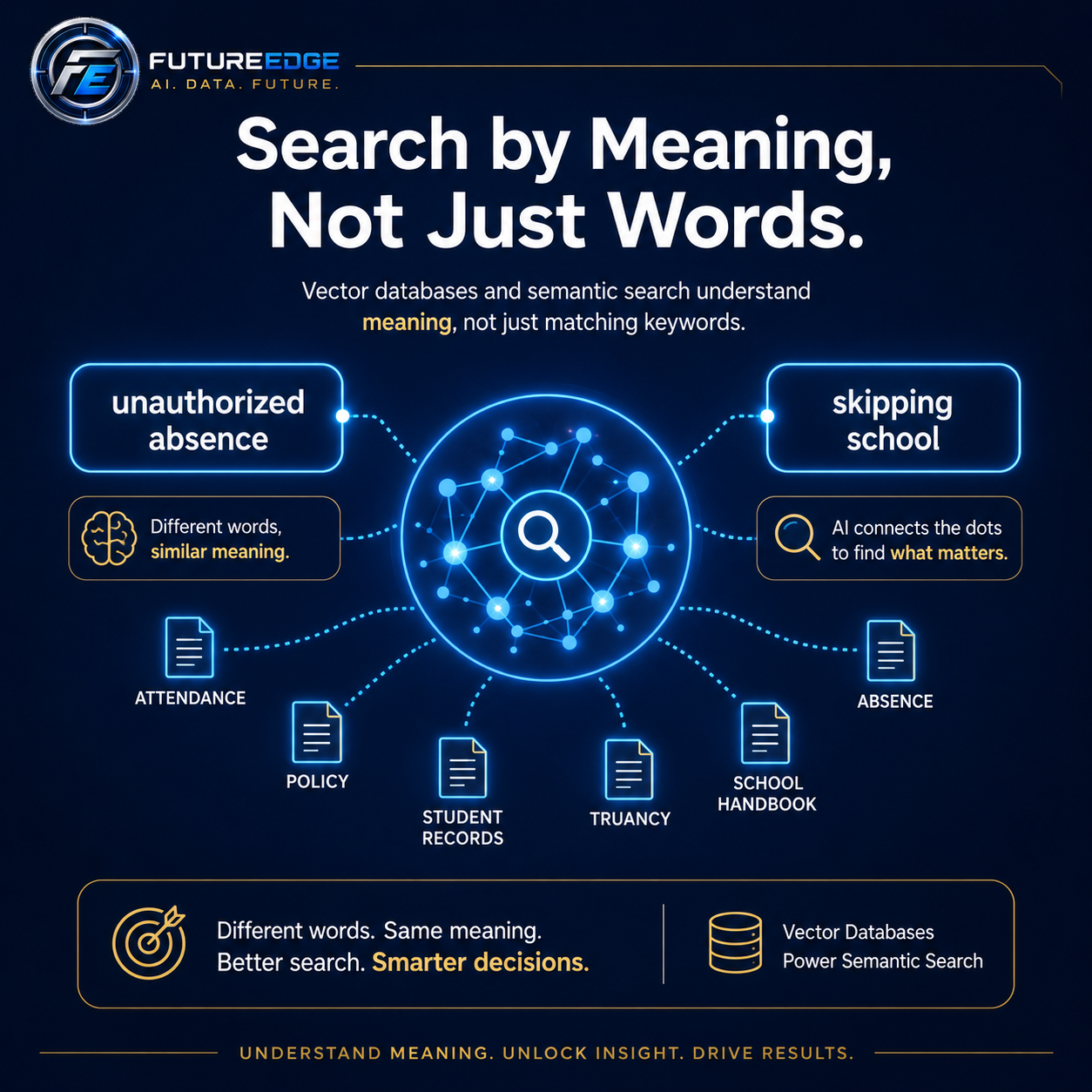
A school handbook might use the phrase “unauthorized absence.”
A parent might ask about “skipping school.”
The wording is different, but the meaning is closely related.
A vector database helps an artificial intelligence system recognize that connection.
What is a vector database?
A vector database stores information in a way that helps computers compare meaning.
When documents are added to the system, sections of text are converted into mathematical representations called vectors. Information with similar meaning is placed closer together in this mathematical space.
This allows an AI system to search based on ideas instead of relying only on exact keyword matches.
For example, a semantic search system may recognize that these phrases are related:
Skipping school
Unauthorized absence
Truancy
Unexcused absence
Missing class without permission
A traditional keyword search may miss some of those relationships. Vector search is designed to find them.
What does semantic search mean?
Semantic search is a type of search that focuses on meaning and context.
A regular search engine may look for the exact words someone typed. A semantic search system tries to understand what the person is asking about.
For example, an administrator might search:
“A student left campus without permission.”
The district handbook may not contain those exact words. It might instead use language such as:
“Unauthorized departure from school grounds.”
A meaning-based search system can recognize that the two descriptions are closely related and retrieve the relevant policy.
That is what makes vector search especially useful for AI applications.
How vector databases support AI
A vector database often works behind the scenes in an AI system.
The basic process looks like this:
Documents are divided into smaller sections.
Each section is converted into a vector that represents its meaning.
The vectors are stored in a searchable database.
A user asks a question in ordinary language.
The question is also converted into a vector.
The system finds document sections with the most similar meaning.
The AI uses those sections to help create an answer.
This process is commonly used in retrieval-augmented generation, also known as RAG.
The vector database helps find the information. The AI model then uses that retrieved information to generate a response.
How schools can use vector databases
Schools store large amounts of important information across board policies, student handbooks, employee manuals, athletic rules, procedures, forms, and guidance documents.
The challenge is that administrators may not know the exact title or wording of the document they need.
A vector-powered search system can help school leaders locate relevant information by describing the situation in plain language.
Possible school applications include:
Board policy search
Student handbook search
Attendance and discipline research
Athletic eligibility guidance
Employee procedure retrieval
Special education process support
Form and template discovery
Similar incident research
Community Education procedure search
School example
A principal might search:
“A student made a threatening social media post from home, but other students saw it during the school day.”
The exact wording may not appear in one policy.
A vector search system could identify related sections involving:
Threats
Student safety
Off-campus conduct
Technology use
School disruption
Law enforcement notification
The system could then present the most relevant documents for the administrator to review.
How businesses can use vector databases
Businesses also store important information across contracts, policies, proposals, customer records, support tickets, procedures, product manuals, and meeting notes.
Employees often remember the idea they are looking for, but not the exact wording or file name.
A vector database can help employees find related information even when the terminology has changed.
Possible business applications include:
Contract search
Employee handbook questions
Customer support knowledge
Proposal and RFP development
Product documentation
Standard operating procedures
Sales enablement
Compliance research
Similar customer issue discovery
Business example
A consulting company receives a new request for proposal asking about:
“Organizational change support and staff adoption.”
The company may not have used those exact words in previous proposals.
A vector search system could still locate past materials related to:
Change management
Staff training
Implementation support
Stakeholder communication
Technology adoption
The system could then help employees reuse approved content and identify relevant case studies.
Vector databases are not a complete solution by themselves
Vector search is powerful, but semantic similarity does not always mean the result is correct.
A document can be related to the question without being the controlling or most authoritative source.
For that reason, strong AI search systems usually combine vector search with additional controls.
These may include:
Keyword search
Document permissions
Date filters
Department filters
Document type filters
Version control
Source citations
Relevance scoring
Reranking
Human review
Evaluation testing
For example, a school district may need to limit results to the current school year or the latest version of a board policy.
A business may need to prevent one client’s confidential information from appearing in another client’s search results.
Why metadata matters
Metadata is information attached to a document or document section.
It can include:
Document title
Department
School year
Effective date
Policy number
Confidentiality level
Client name
Record type
Author
Version
Metadata helps the search system narrow results before comparing meaning.
For example, a district administrator might search only current board policies, while an athletic director might search only association rules and athletic handbooks.
A business user might search only active contracts from a specific customer.
This makes the results more relevant and more secure.
Vector search and RAG work together
Vector databases and RAG are closely connected, but they are not the same thing.
A vector database helps locate information that is similar in meaning.
RAG uses that retrieved information to help an AI model create an answer.
A simple way to understand the difference is:
Vector search finds the right information. RAG uses that information to create a grounded response.
Both parts need to work well.
Even a powerful AI model can produce a weak answer if the search system retrieves the wrong documents.
How should vector search be tested?
Organizations should not assume that semantic search works simply because it produces results.
It should be tested using realistic examples.
A school might test whether the system can connect:
“Skipping school” with “unauthorized absence”
“Leaving campus” with “unauthorized departure”
“Online threat” with “student safety and off-campus conduct”
“Failed a class” with “academic eligibility”
“Parent complaint” with “grievance procedure”
A business might test whether the system can connect:
“Cancel the agreement” with “termination clause”
“Late payment” with “delinquent account”
“Staff training” with “employee onboarding”
“Customer problem” with “support escalation”
“Price reduction” with “discount approval”
Testing helps determine whether the system retrieves the right information consistently.
Search by meaning, but verify the source
Vector databases make AI search more flexible and natural.
Users do not need to know the exact wording inside a policy, contract, or procedure. They can describe what they are trying to find in everyday language.
That can save time and make organizational knowledge easier to access.
However, the final answer should still show the source, respect permissions, and allow the user to confirm the information.
The goal is not simply to find something related.
The goal is to find the most relevant, current, and trustworthy information.
Build smarter search around your organization’s knowledge
Vector databases are one of the technologies that make modern AI systems more useful.
They help schools and businesses search large collections of information by meaning, not only by exact words.
When combined with strong document controls, citations, evaluation testing, and human oversight, semantic search can help employees find the right information faster and make better-informed decisions.
FutureEdge Consultancy helps schools and businesses explore practical AI search systems built around the information they already use.
Learn more at fe515.com.

AI Evaluations: Test AI Before People Depend on It
I evaluations help organizations measure whether an artificial intelligence system is accurate, consistent, secure, and ready for real-world use. Learn how schools and businesses can test AI before employees, students, customers, or leaders depend on it.
Many organizations evaluate an AI tool by asking it a few questions and deciding that the answers look good.
That is not enough.
AI systems can appear impressive during a demonstration and still fail when they encounter unusual wording, incomplete information, conflicting documents, or high-stakes decisions.
Before people depend on an AI system, it needs structured testing.
These tests are commonly called AI evaluations, or evals.
What is an AI evaluation?
An AI evaluation is a repeatable way to measure how well an AI system performs.
Instead of relying on general impressions, developers and organizations create a collection of realistic test cases. The system is then scored against clearly defined expectations.
For example, a school district evaluating a policy assistant might test whether it:
Finds the correct board policy
Uses the current version of the document
Provides an accurate answer
Includes the right citation
Identifies missing information
Avoids inventing requirements
Protects confidential information
Recommends human review when necessary
A business might test whether an AI customer-service system follows refund policies, protects customer data, escalates serious complaints, and avoids offering unauthorized discounts.
What should be measured?
Accuracy is important, but it is not the only measurement.
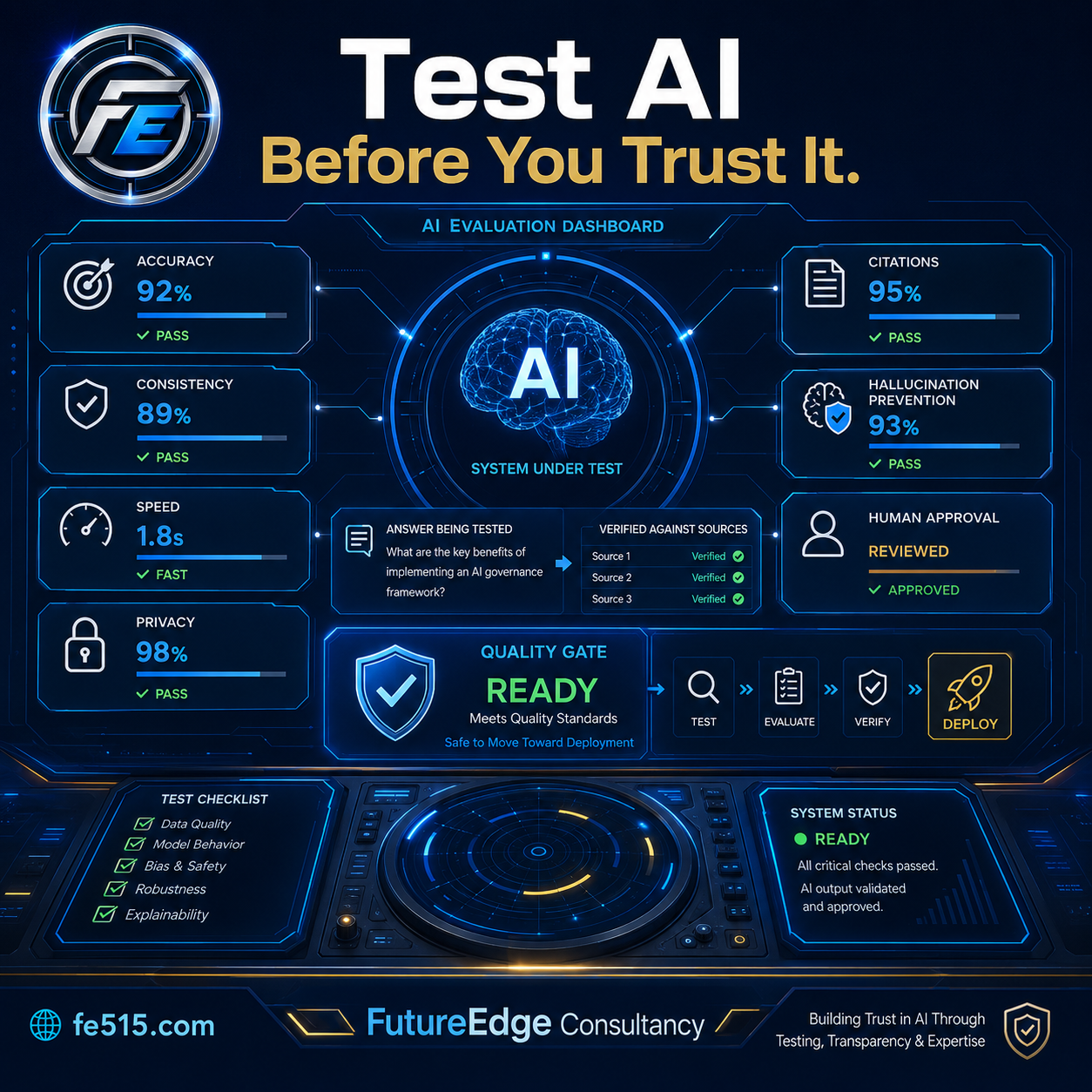
A useful evaluation process may examine:
Consistency: Does the system respond similarly to similar situations?
Citations: Are the claims supported by the documents being referenced?
Hallucination prevention: Does the AI avoid creating facts that are not supported?
Privacy: Does it protect information users should not see?
Speed: Does it provide results within a reasonable amount of time?
Cost: How much does each interaction or workflow cost?
Tool use: Does the agent select and use the correct system or function?
Human approval: Does it pause before taking sensitive actions?
These measurements create a more complete picture of whether the AI is ready for real use.
Why evaluations matter after launch
Testing should not stop once the system is released.
AI applications change when organizations:
Add new documents
Rewrite prompts
Change models
Add tools
Update policies
Modify workflows
Introduce new user groups
A change that improves one type of answer may accidentally make another type worse.
A repeatable evaluation set allows the organization to compare performance before and after each change. This helps identify regressions before users experience them.
What a basic evaluation process looks like
An organization can begin with 50 to 100 realistic examples.
Each example should include:
The user’s question or situation
The expected source
The required elements of a good answer
Unacceptable outcomes
Whether human review is required
The system can then be tested and scored against those expectations.
Over time, new examples should be added based on real questions, errors, and unusual situations encountered by users.
Trust requires evidence
Schools and businesses should not accept claims that an AI system is accurate, secure, or reliable without evidence.
A professional AI product should be able to show how it was tested, what standards it met, and where limitations remain.
Evaluations do not make AI perfect. They make its performance more visible, measurable, and manageable.
That is a major part of responsible implementation.
FutureEdge Consultancy helps organizations evaluate AI systems for accuracy, reliability, citations, privacy, and real-world readiness.
Learn more at fe515.com.

RAG: How AI Can Answer Using Your Trusted Information
RAG helps artificial intelligence search an organization’s trusted documents before answering. Learn how schools and businesses can use policies, handbooks, contracts, procedures, and internal records to create more accurate AI tools with supporting citations.
One of the biggest concerns about artificial intelligence is whether its answers can be trusted.
AI models are trained on enormous amounts of information, but they do not automatically know your organization’s current policies, procedures, contracts, employee handbook, or internal records.
That is where RAG becomes important.
RAG stands for retrieval-augmented generation. The term sounds technical, but the idea is straightforward:
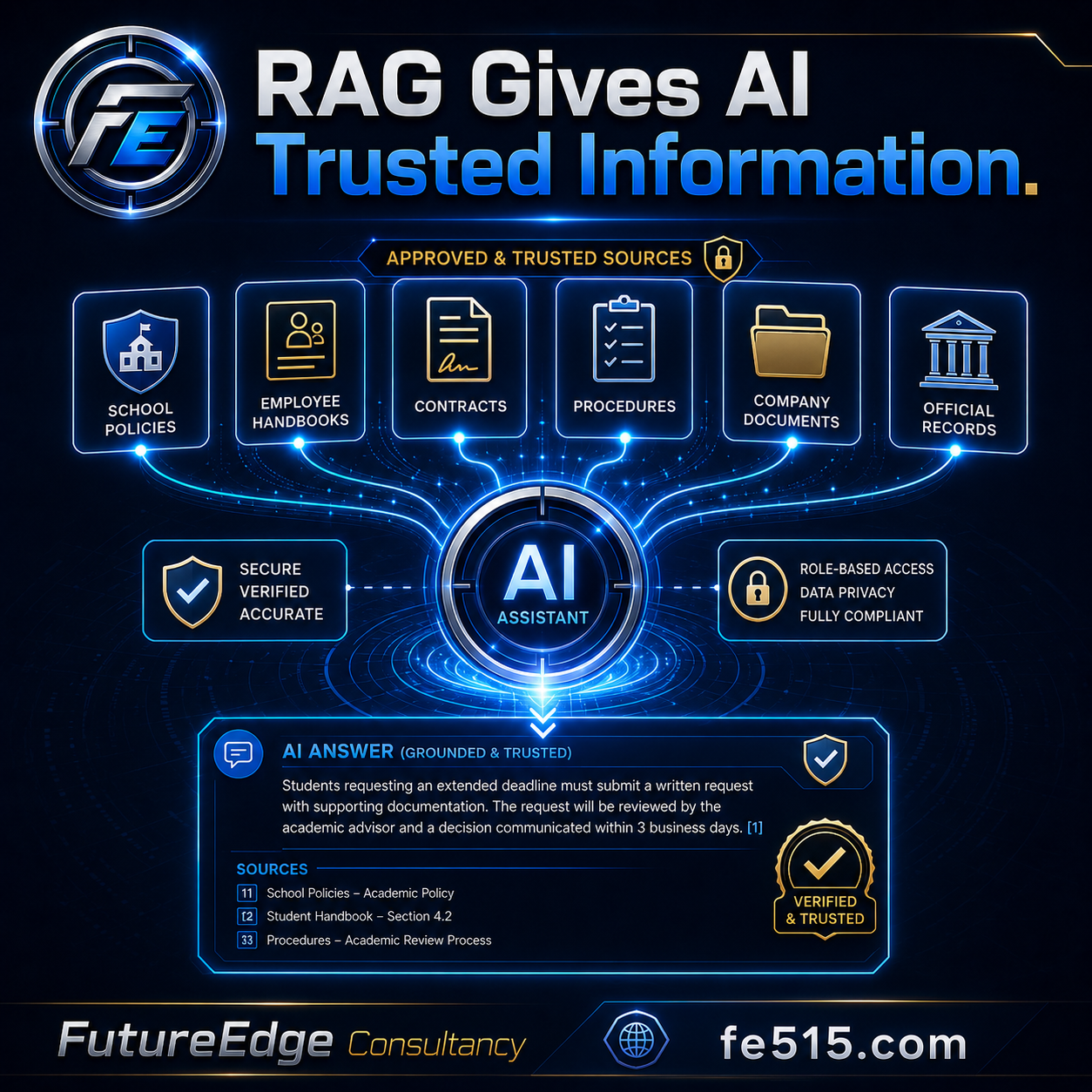
Before the AI answers, it searches your approved information and uses the most relevant material to create its response.
Think of it as giving AI an open-book test using the documents your organization has selected.
Why ordinary AI answers are not always enough
A general AI model may be able to explain common school policies or standard business practices. However, it may not know:
Your district’s board policies
Your student handbook
Your employee procedures
Your negotiated agreements
Your company’s pricing rules
Your current contracts
Your internal approval process
Your most recent forms and documents
Without access to the right information, the AI may provide a general answer that sounds reasonable but does not match your organization.
RAG helps solve that problem by grounding the response in trusted sources.
How RAG works
A RAG system usually follows three basic steps.
First, it searches the organization’s approved documents for information related to the question.
Second, it selects the sections that appear most relevant.
Third, it gives those sections to the AI model so the answer can be based on the retrieved information.
A strong RAG system can also provide citations, document names, page references, and links to the original source.
For example, a principal might ask:
“What steps does our district require before assigning a long-term suspension?”
Instead of relying only on general knowledge, the AI could search the district’s board policies, student handbook, and administrative procedures. It could then provide a response showing the required steps and cite the sections that support the answer.
How businesses can use RAG
Businesses can use the same approach for questions involving:
Employee policies
Customer contracts
Product information
Safety procedures
Pricing guidelines
Standard operating procedures
Previous proposals
Training materials
Compliance requirements
A salesperson could ask whether a particular discount is allowed. An HR employee could find the correct leave procedure. A manager could review contract renewal requirements. A support representative could locate the approved answer to a customer’s technical question.
Not every RAG system is production-ready
Uploading several PDFs to a chatbot may produce an interesting demonstration, but that does not automatically create a dependable organizational system.
A production-quality RAG system also needs:
Accurate document extraction
Clear document organization
Version control
Permission-based access
Reliable search
Source citations
Evaluation testing
Privacy protections
A process for updating outdated information
The ability to say when evidence is insufficient
The goal is not to force the AI to answer every question. The goal is to help it provide supported answers and clearly identify when human review is needed.
A foundation for trustworthy AI
RAG is one of the most practical ways schools and businesses can begin using AI responsibly. It allows organizations to combine the flexibility of generative AI with the authority of their own information.
The result is not simply a smarter chatbot. It is a searchable organizational knowledge system that can support faster and more consistent decision-making.
FutureEdge Consultancy helps organizations turn policies, procedures, and internal documents into practical AI-supported knowledge tools.
Learn more at fe515.com.

AI Agents: Moving Beyond Answers to Completed Work (Copy)
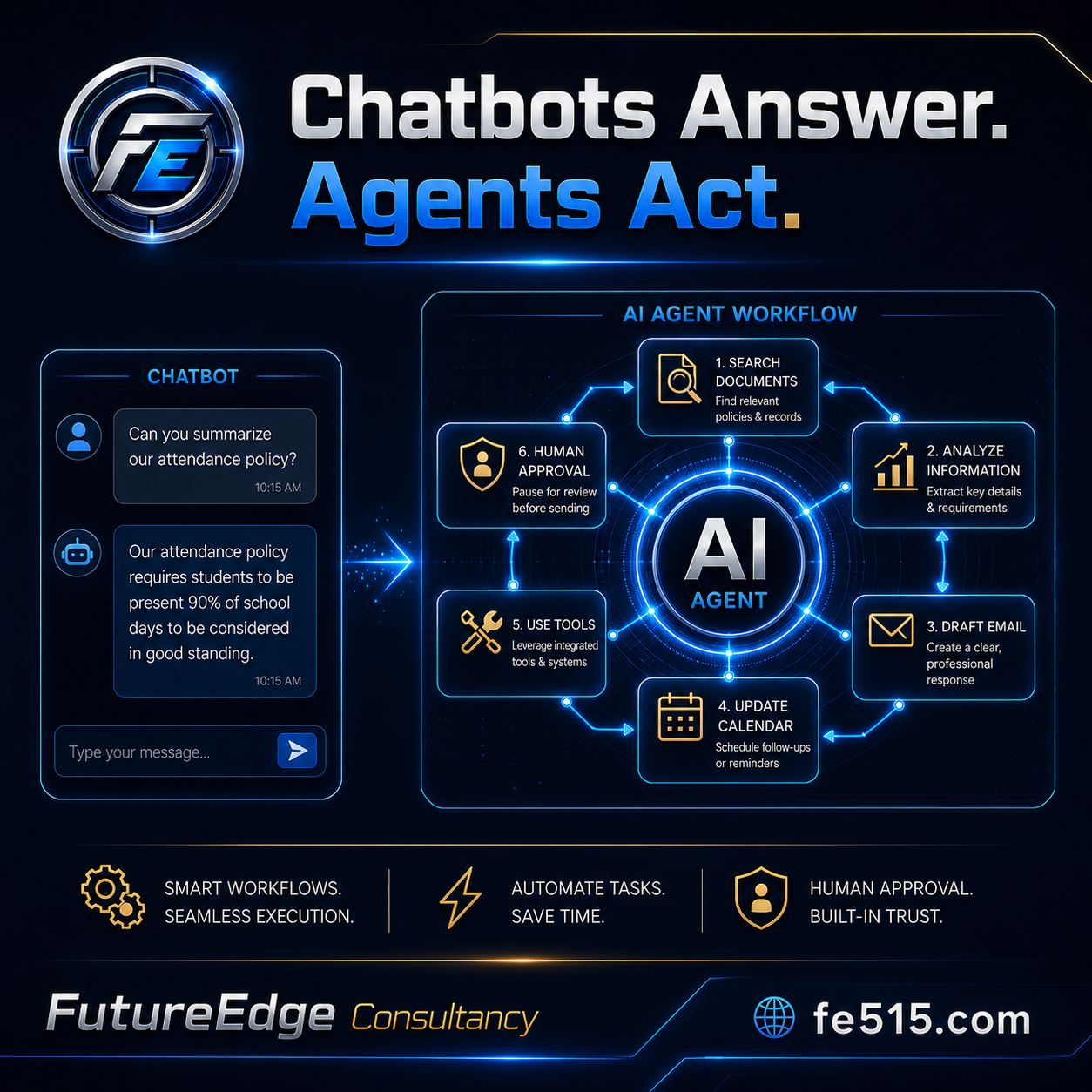
For the past few years, most people have experienced artificial intelligence through a chatbot. You type a question, receive an answer, and decide what to do next.
AI agents represent the next stage.
Instead of only responding to a request, an AI agent can work through multiple steps to help complete a task. It can gather information, search documents, use approved tools, draft communications, update systems, and pause when human review is required.
The difference is simple:
A chatbot gives you information. An AI agent helps you complete the work.
What does an AI agent actually do?
Imagine a school administrator needs to respond to a complicated attendance situation.
A basic chatbot might summarize the district’s attendance policy. An AI agent could go further by:
Searching the district’s current policies and handbook.
Identifying the sections related to the situation.
Asking the administrator for missing details.
Reviewing previous documentation.
Drafting a parent communication.
Creating a follow-up reminder.
Preparing a summary for administrative review.
Pausing before any message is sent.
A business could use a similar process for customer service, employee onboarding, contract review, invoice follow-up, or sales outreach.
The agent is not simply creating text. It is coordinating a workflow.
Why does this matter for schools and businesses?
Most organizations do not struggle because they lack information. They struggle because their information is scattered across documents, email, calendars, databases, and different software platforms.
Employees spend significant time moving information between those systems.
An AI agent can help connect the steps. It can reduce repetitive work while still keeping people in control of important decisions.
This is especially valuable for smaller departments where a few employees are responsible for a large number of tasks.
A well-designed agent can help an organization:
Reduce repetitive administrative work
Respond more consistently
Find information faster
Create better documentation
Track follow-up responsibilities
Improve communication
Maintain an audit trail
Human approval still matters
An agent should not be given unlimited authority.
Schools and businesses must decide what the AI can read, draft, recommend, change, or send. High-impact actions should require human approval.
For example, an AI agent might be allowed to draft a parent email, but an administrator should review it before it is sent. It might prepare an invoice, but a finance employee should approve the amount. It might recommend a disciplinary process, but the school leader remains responsible for the decision.
The strongest systems combine AI efficiency with professional judgment.
A practical starting point
Organizations should begin with one clearly defined workflow.
Choose a process that:
Happens frequently
Includes several repeatable steps
Requires information from multiple sources
Takes employees a meaningful amount of time
Can be reviewed before final action
Do not begin by trying to automate an entire organization. Start with one process, measure the results, and improve it carefully.
AI agents will not replace the need for leadership, expertise, or accountability. They can, however, help capable people spend less time on repetitive processes and more time on decisions that require human experience.
FutureEdge Consultancy helps schools and businesses explore practical AI systems built around real organizational needs.
Learn more at fe515.com.

AI Agents Are Moving Beyond Chatbots: What Should You Automate First?
AI AGENTS ARE MOVING BEYOND CHATBOTS
Author: Jake Burke, Founder of FutureEdge Consultancy | Johnston, Iowa
Most people first experienced generative AI through a chatbot. They typed a question, received an answer, and decided what to do with it.
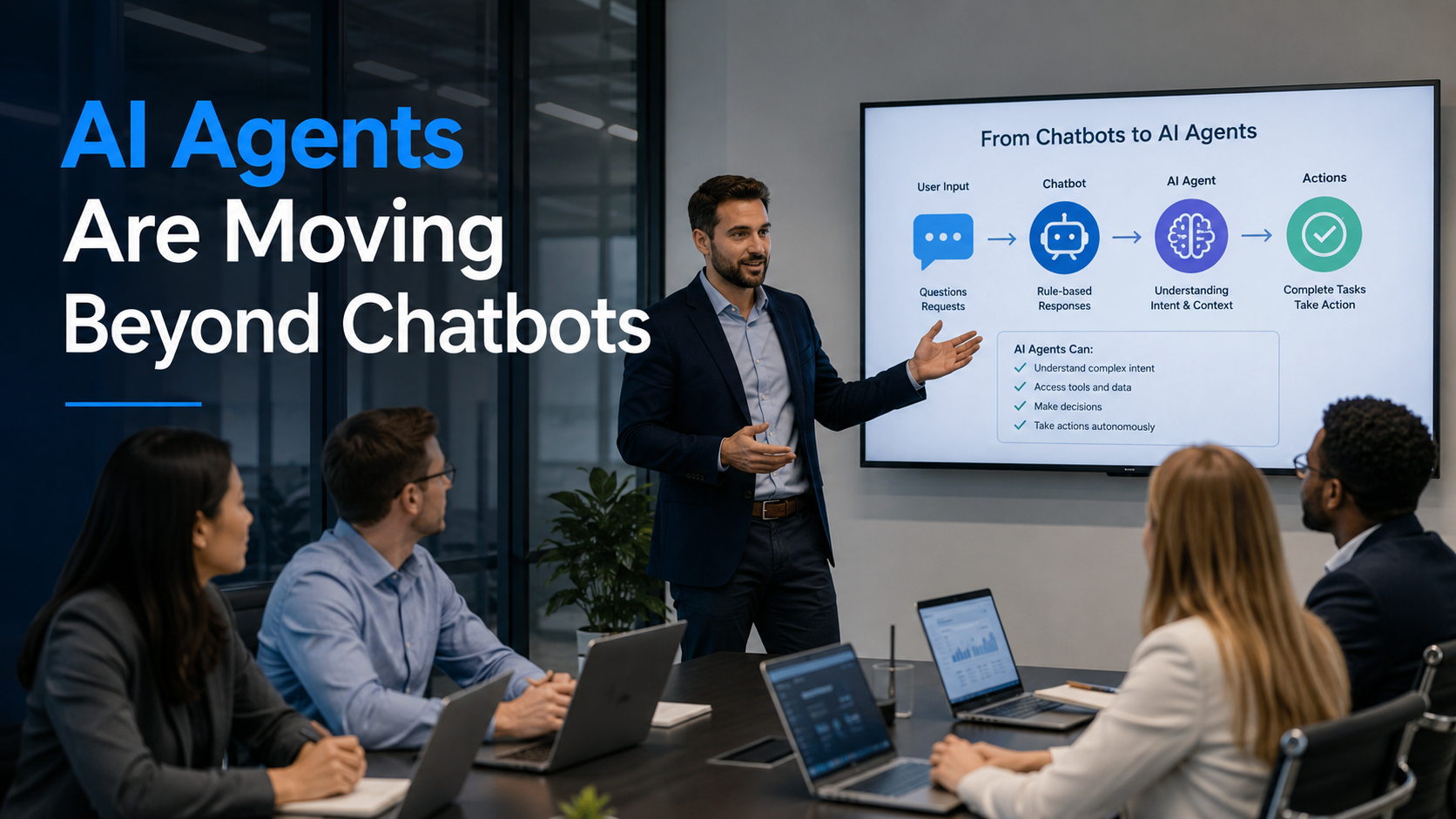
AI agents represent the next stage. Instead of only creating a response, an agent may be able to complete several connected steps, use approved tools, retrieve information, update systems, and prepare work for human review.
That sounds powerful, but it also creates an important question:
What should your organization automate first?
What Is an AI Agent?
A traditional chatbot normally responds to one request at a time. An AI agent is designed to work toward a goal.
For example, an AI assistant might draft a follow-up email after a meeting. An AI agent could potentially review the meeting notes, identify action items, prepare separate messages, update a project tracker, and schedule reminders.
The difference is action.
However, the term “AI agent” is being used loosely. Some products described as agents are simply chatbots connected to one or two automated steps. Organizations should focus less on the label and more on what the system can actually do.
Most Organizations Are Still Early
The 2026 OECD survey of small and medium-sized businesses found that AI adoption is broad but often shallow. Only 5% of surveyed businesses reported using customized AI, while approximately 3.6% reported deploying agentic AI.
That is not necessarily a problem.
Being early does not mean trying the most advanced technology available. It means learning how to use the technology responsibly before it becomes standard.
The safest path is to begin with a narrow workflow that is repetitive, measurable, and easy for a person to review.
Good First Workflows for an AI Agent
Strong starting points may include:
Meeting follow-up: Turning notes into action items, draft emails, and project updates.
Information intake: Sorting routine requests and routing them to the appropriate person.
Document preparation: Gathering information from approved sources and producing a first draft.
Recurring reports: Collecting established data and placing it into a consistent reporting format.
Internal knowledge support: Helping employees locate policies, procedures, forms, or instructions.
These tasks consume time, but they usually do not require an AI system to make a final high-stakes decision.
What Should Not Be Automated First?
Do not begin with a workflow where an inaccurate output could seriously affect a student, employee, customer, or organization.
Examples include final disciplinary decisions, hiring decisions, legal conclusions, employee evaluations, financial approvals, or decisions involving protected personal information.
AI may support parts of these processes, but the system should not independently make the final determination.
Human review becomes more important as the consequences of an error increase.
Start With the Workflow, Not the Tool
A common mistake is purchasing an AI platform and then searching for something it can do.
Reverse that process.
Choose one workflow that currently creates delays or repetitive work. Map each step. Identify where decisions are made. Determine what information is needed. Decide where human approval must remain.
Only then should you select or build the technology.
Deloitte’s 2026 enterprise AI report identifies the AI skills gap as a major barrier to successful integration. This reinforces the importance of training employees and redesigning the work itself, rather than assuming a new tool will solve the problem automatically.
A Simple 30-Day Pilot
A practical AI agent pilot can follow four steps:
Week 1: Document the current workflow and establish a baseline for time, cost, and errors.
Week 2: Build or configure a limited AI-assisted version.
Week 3: Test it with a small group while requiring human review.
Week 4: Compare the results with the original process and decide whether to improve, expand, or discontinue the pilot.
A successful pilot should produce measurable value, not just an impressive demonstration.
The Goal Is Better Work
AI agents will become more common, but organizations should not rush to automate everything.
The goal is to reduce unnecessary work while preserving human judgment, accountability, and trust.
Start small. Measure the results. Keep a person responsible for the outcome.
🔗 Learn about FutureEdge workflow and automation services
Ready to Identify Your First AI Workflow?
FutureEdge helps organizations evaluate repetitive work, select appropriate AI tools, and build systems that employees can use confidently.

AI News Without the Noise: Why Leaders Need a Better Way to Keep Up
AI News without the noise.
Author: Jake Burke, Founder of FutureEdge Consultancy | Johnston, Iowa
Artificial intelligence is changing faster than most people have time to follow. New tools are released, existing platforms add features, policies change, and headlines often make every announcement sound urgent.
For school leaders, business owners, and working professionals, the problem is no longer finding information about AI. The real problem is deciding which information actually matters.
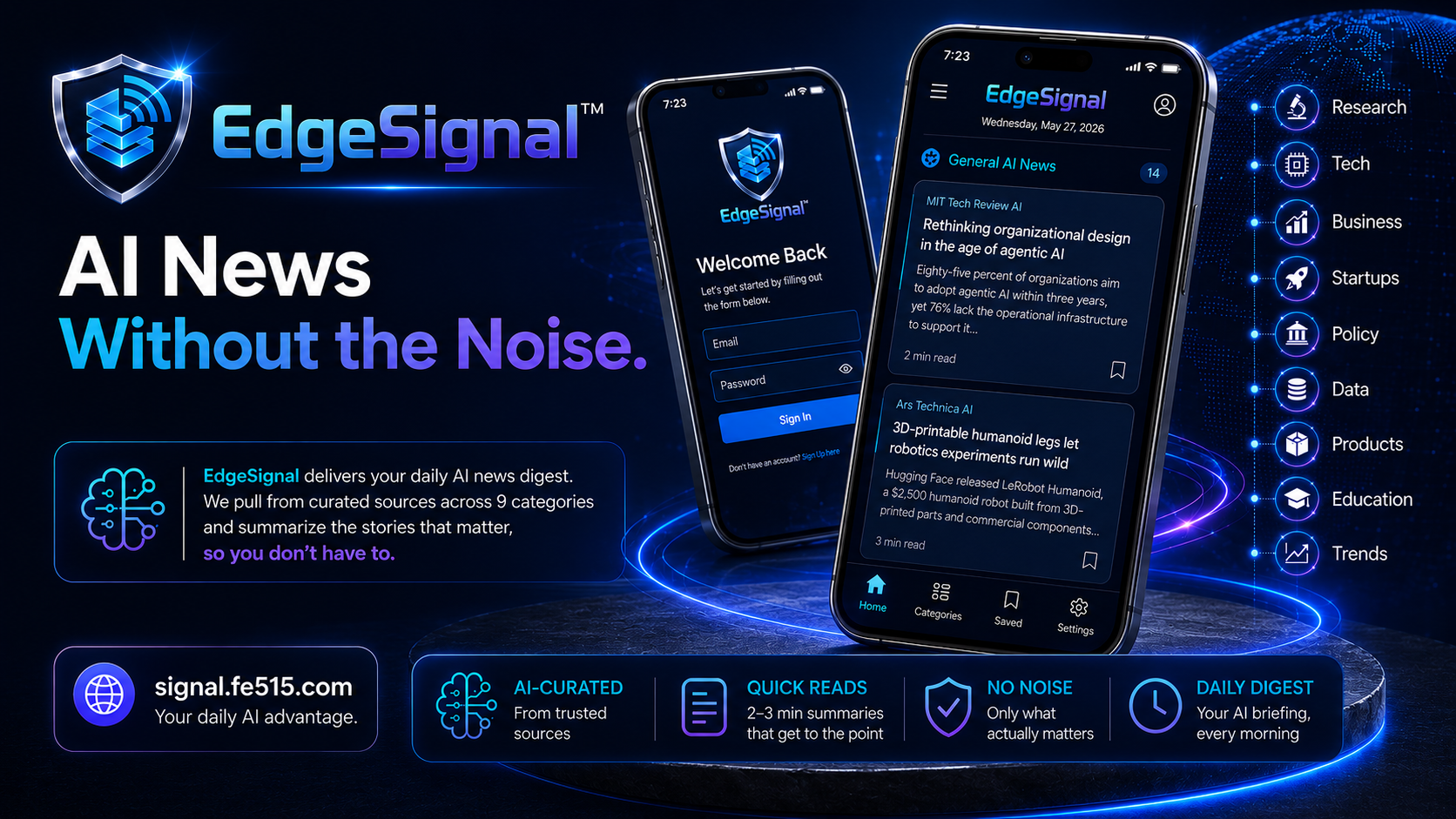
That is the purpose behind EdgeSignal, the AI news feed from FutureEdge.
The Cost of Falling Behind
AI is moving from occasional experimentation into everyday work. The 2026 Stanford AI Index reports that organizational AI adoption has reached 88%, while generative AI has spread faster than earlier technologies such as the personal computer and the internet.
This does not mean every organization is using AI effectively. It does mean that leaders can no longer afford to ignore major developments.
A new feature could save employees hours of work. A policy change could affect how an organization handles data. A security concern could make a popular tool inappropriate for certain tasks. A new AI model could make last year’s expensive solution unnecessary.
Staying informed is becoming part of responsible leadership.
The Cost of Trying to Read Everything
Following AI news can quickly become a full-time job.
Information is scattered across technology publications, company announcements, social media posts, newsletters, podcasts, research reports, and online videos. Much of it is repetitive. Some of it is exaggerated. Some of it is written for highly technical audiences.
The result is often one of two extremes.
People either stop paying attention because the volume is overwhelming, or they spend too much time chasing every new tool and announcement.
Neither approach helps an organization make better decisions.
What EdgeSignal Is Designed to Do
EdgeSignal is designed around a simple idea: help people stay current on important AI developments without having to search through the noise.
The EdgeSignal website describes its purpose as “AI News Without the Noise.” FutureEdge created it for people who want a clearer way to monitor what is happening and identify information that may affect their work.
The goal is not to convince users that every AI development is revolutionary. It is to provide a focused place where educators, administrators, business owners, and organizational leaders can stay connected to the larger AI landscape.
Information Should Lead to Better Decisions
Keeping up with AI should not be about collecting random facts. Useful information should help you answer practical questions:
Is there a new tool worth testing?
Does a recent development affect our current AI policy?
Are there new privacy or security concerns?
Could a new feature improve one of our existing workflows?
Is this an important change, or is it simply another overhyped announcement?
The most valuable AI news is information that helps you decide what to do next.
Who Can Benefit From EdgeSignal?
EdgeSignal can support anyone who needs to understand AI but does not have hours each week to research it.
A superintendent might use it to monitor developments affecting education. A small business owner might discover a tool that improves customer communication. A department leader might use it to identify training topics. An educator might use it to stay aware of tools students are already encountering.
Each person may use the information differently, but they share the same need: reliable awareness without information overload.
Stay Curious Without Becoming Distracted
Organizations do not need to adopt every new AI tool. They do need a dependable way to monitor change.
The strongest leaders will be the ones who remain curious, ask good questions, and separate useful developments from short-lived hype.
EdgeSignal was built to help make that possible.
Ready to Build an AI Strategy?
FutureEdge helps schools, businesses, and organizations understand new AI developments and turn the right opportunities into practical systems.

AI Literacy Is the New Digital Literacy: What Schools Need to Teach Now
For years, schools have taught students how to search online, evaluate websites, protect passwords, use productivity software, and behave responsibly in digital spaces.
Artificial intelligence now requires an expanded set of skills.
AI literacy is not simply knowing how to open ChatGPT or write a prompt. It is understanding how AI works, recognizing its limitations, protecting information, evaluating its output, and deciding when it should or should not be used.

Author: Jake Burke, Founder of FutureEdge Consultancy | Johnston, Iowa
For years, schools have taught students how to search online, evaluate websites, protect passwords, use productivity software, and behave responsibly in digital spaces.
Artificial intelligence now requires an expanded set of skills.
AI literacy is not simply knowing how to open ChatGPT or write a prompt. It is understanding how AI works, recognizing its limitations, protecting information, evaluating its output, and deciding when it should or should not be used.
These skills are becoming part of basic digital readiness.
Students Are Already Using AI
Schools do not get to decide whether students will encounter artificial intelligence. Students are already using AI through search engines, writing tools, study platforms, social media, smartphones, and workplace software.
The 2026 Stanford AI Index reports that four out of five university students now use generative AI. The larger lesson for K-12 schools is clear: students will enter college and the workforce in environments where AI use is common.
A strategy based only on blocking AI will not prepare students for that reality.
What Does AI Literacy Include?
The OECD and European Commission released an AI Literacy Framework for primary and secondary education in 2026. The framework is intended to help schools define the knowledge and skills learners need in an AI-influenced world.
In practical terms, AI literacy should help students and staff develop five core abilities.
Understand What AI Is Doing
Students should understand that an AI system predicts and generates responses based on patterns in data. It does not think, understand, or know information in the same way a person does.
This helps students avoid treating an AI response as automatically correct.
Communicate Clearly With AI
Prompting is a useful skill, but it should be taught as clear communication and problem definition.
Students should learn to provide context, define the desired outcome, request an appropriate format, and revise their instructions when the first response is not useful.
Verify AI-Generated Information
AI systems can produce confident answers that contain errors, false citations, missing context, or outdated information.
Students should learn to check claims against reliable sources, confirm calculations, inspect citations, and recognize when expert assistance is needed.
Protect Personal and Organizational Information
Students and employees should understand that information entered into an AI tool may be stored or processed outside the school.
Names, grades, disability information, disciplinary records, employee data, passwords, confidential documents, and other protected information should not be entered into unapproved tools.
Use AI Honestly and Responsibly
Schools need clear expectations for when AI assistance is allowed and how its use should be disclosed.
Using AI to receive feedback on a draft may be appropriate. Submitting an AI-generated assignment as original work may not be.
The goal is to teach responsible use, not simply create a longer list of prohibited behaviors.
Teachers Need AI Literacy Too
Staff members cannot teach what they have not had an opportunity to learn.
Teachers need practical training on how students use AI, how to redesign assignments, how to verify AI outputs, and how to discuss responsible use. Administrators need training on privacy, procurement, communication, and policy enforcement.
A single presentation is a starting point, not a complete AI literacy program.
Schools should provide examples, guided practice, common language, and ongoing opportunities for employees to ask questions.
Move From Detection to Learning
Many early conversations about AI in education focused on detecting cheating.
Academic integrity remains important, but detection alone is not a long-term strategy. AI detection tools can be unreliable, and students need more than enforcement.
Schools should design learning experiences that require explanation, reflection, revision, discussion, and evidence of the student’s thinking.
The best defense against inappropriate AI use is meaningful instruction combined with clear expectations.
Prepare Students for the World They Are Entering
AI literacy does not mean allowing AI to complete every task. Students still need to read, write, calculate, create, collaborate, and think independently.
It means teaching students how to use a powerful technology without surrendering their own judgment.
That is now an essential part of preparing students for college, careers, and citizenship.
🔗 Explore FutureEdge AI training for educators
Build an AI Literacy Plan for Your School
FutureEdge helps schools create practical AI training, staff expectations, classroom guidance, and implementation plans.

AI Workflow Automation for Small Businesses: Where to Start
Author: Jake Burke, Founder of FutureEdge AI | Johnston, Iowa
If you own or manage a small business, you have probably heard that AI can save you time and money. But the reality for most small business owners is less clear: where exactly do you start, and what should you automate first? AI workflow automation for small businesses does not require a massive budget, a technical team, or a complete overhaul of how you work. It starts with one workflow that currently takes too much time.
In 2026, businesses that have strategically implemented AI are seeing measurable improvements. Reports indicate that organizations using AI for operational efficiency are reducing processing times by fifty to eighty percent for repetitive tasks. For small businesses with limited staff, those savings translate directly to capacity you cannot afford to hire for.
What AI Workflow Automation Actually Looks Like
Workflow automation is not a single tool. It is a system where AI handles specific steps in a process that would otherwise require manual effort. The goal is not to automate everything but to identify the repetitive, time-consuming steps in your most common workflows and let AI handle them.
Five Workflows Every Small Business Should Automate First
1. Email Drafting and Responses
If you spend more than thirty minutes per day writing emails, this is your first automation target. AI tools can generate email drafts based on the context you provide, suggest responses to incoming messages, and maintain consistent tone and messaging across your team. You review and send. The AI handles the blank-page problem.
2. Meeting Notes and Follow-Ups
AI transcription tools can join your meetings, create structured summaries, identify action items, and draft follow-up emails. Instead of spending twenty minutes after every meeting writing notes, you get a complete summary delivered the moment the meeting ends.
3. Social Media Content Creation
Maintaining a social media presence is important but time-consuming. AI can generate post ideas, draft captions, suggest hashtags, and even create visual content concepts based on your brand guidelines. A task that used to take three hours per week can be reduced to thirty minutes of review and scheduling.
4. Invoice and Proposal Generation
If you send similar proposals or invoices to multiple clients, AI can generate customized versions based on templates you provide. You input the client details and scope, and the AI produces a professional document ready for review. This is especially valuable for service-based businesses that quote custom work regularly.
5. Customer FAQ and Support
A custom GPT trained on your product information and frequently asked questions can handle the majority of routine customer inquiries. This does not mean replacing personal customer service. It means ensuring that the simple questions, the ones that take two minutes each but add up to hours every week, get answered instantly while your team focuses on complex issues.
🔗 FutureEdge builds custom GPTs and automation systems for small businesses
How to Get Started Without a Big Budget
You do not need enterprise software to begin automating workflows. Many AI tools offer free tiers or subscriptions under thirty dollars per month that are sufficient for small business use. The key investment is not money but time: spending a few hours upfront to configure your tools and learn effective prompting will pay back exponentially.
Start with one workflow. Automate it. Measure the time savings. Then move to the next one. This incremental approach keeps the learning curve manageable and builds confidence across your team.
The Compound Effect of Small Automations
Each individual automation might save you only twenty or thirty minutes per day. But when you stack five or six of them together, you are recovering ten to fifteen hours per week. For a small business owner, that is the difference between constantly catching up and actually having time to grow your business.
AI workflow automation for small businesses is not about replacing your judgment or your relationships. It is about eliminating the administrative drag that keeps you from doing your best work.
Ready to Get Started?
Want to implement this in your organization? FutureEdge helps schools and businesses across Iowa build practical AI systems that save time and improve results.

The ROI of AI Training: Why Year Two Is Where the Value Compounds
Author: Jake Burke, Founder of FutureEdge AI | Johnston, Iowa
Most organizations treat AI training as a one-time event. They bring in a consultant, run a workshop, and check the box. Six months later, half the team has stopped using the tools. The AI training ROI from that single session diminishes quickly because there was no system to sustain the momentum.
The real value of AI training does not show up in the first session. It shows up in year two, when your team has moved past the basics and starts building AI into their daily workflows in ways that compound over time.
Why Most Organizations See Limited AI Training ROI in Year One
Year one is about foundation building. Your team learns what AI tools are available, how to write effective prompts, and where AI can fit into their existing work. This is essential, but it is also where most organizations plateau. Research indicates that most organizations achieve satisfactory returns on AI investments within two to four years. Only six percent see payoff in under twelve months.
The challenge is not the training itself. The challenge is that people need time to experiment, make mistakes, and discover which AI applications actually save them time. Year one is about exploration. Year two is about execution.
What Changes in Year Two
Staff Move from Prompting to System Building
In year one, your team learns how to ask AI for help with individual tasks. In year two, they start connecting those individual tasks into systems. An administrator who used AI to draft one email at a time now builds a template library with AI-generated drafts for every recurring communication. A school business official who used AI to answer one budget question now has a custom tool that runs comparative analysis across accounts automatically.
Institutional Knowledge Gets Embedded
As your team uses AI tools consistently, the prompts, templates, and workflows they create become organizational assets. New hires can access these tools on day one instead of spending weeks getting up to speed. This is where AI training ROI starts compounding because the investment in training one person now benefits every person who follows.
The Cost of Not Continuing Becomes Clear
Industry data shows that the gap between organizations committed to AI and those still experimenting is widening rapidly. Companies that treat AI training as ongoing investment report dramatically different outcomes than those that treat it as a one-time expense. The compounding effect means that organizations that invested early in AI are reinvesting their returns into stronger capabilities, creating a widening advantage over those who have not.
🔗 Explore FutureEdge Edge-Learning tiers for ongoing AI training
How to Structure Year Two Training
Year two training should feel different from year one. Instead of introductory workshops, focus on advanced use cases specific to each department. Have team members present the AI workflows they have built to their colleagues. Introduce new tools and capabilities that were not available when training started. Review and optimize the systems built in year one.
The most effective approach is a combination of quarterly group sessions and ongoing access to a consultant who can answer questions, troubleshoot issues, and help teams push past intermediate-level use.
The Year Two Advantage in Numbers
Consider a team of ten people who each save three hours per week through AI. At an average labor cost of thirty-five dollars per hour, that is over fifty-four thousand dollars in annual value. In year one, that number ramps up slowly as people learn the tools. By year two, the time savings are consistent and the workflows are refined. By year three, those systems are training new employees and the original investment is generating returns without additional cost.
That is why year two is where the value compounds. The hardest part, the learning curve, is behind you. Everything that follows builds on a foundation that is already in place.
Ready to Get Started?
Want to implement this in your organization? FutureEdge helps schools and businesses across Iowa build practical AI systems that save time and improve results.

How to Choose the Right AI Consultant for Your School or Business
Author: Jake Burke, Founder of FutureEdge AI | Johnston, Iowa
The AI consulting market has exploded. Everyone from enterprise technology firms to solo freelancers now claims to be an AI consultant. For school districts and small businesses trying to navigate AI adoption, choosing the right AI consultant for schools or organizations is one of the most important decisions you will make.
The wrong choice wastes budget, creates confusion, and leaves your team no closer to actually using AI effectively. The right choice gives you a clear strategy, practical tools, and the confidence to move forward. Here is how to tell the difference.
What to Look for in an AI Consultant
Industry-Specific Experience
AI consulting for a Fortune 500 tech company looks nothing like AI consulting for a school district. The best AI consultant for schools understands education workflows, compliance requirements, and the real constraints that administrators and teachers face every day. Ask whether the consultant has worked with organizations like yours and whether they can show examples of tools or strategies they have implemented in similar environments.
Practical Implementation Over Theory
Many consultants deliver impressive presentations about AI trends but leave your team without a clear next step. The right consultant focuses on practical implementation. They should be able to answer: What will my team be able to do after working with you that they cannot do right now? If the answer is vague, keep looking.
Custom Solutions, Not Generic Templates
Your organization has unique workflows, unique data, and unique challenges. A consultant who offers the same package to every client is unlikely to deliver meaningful results. Look for someone who asks detailed questions about your operations before proposing solutions. The discovery process should feel like a conversation, not a sales pitch.
Ongoing Support and Training
AI adoption is not a one-time event. Tools evolve, staff changes, and new use cases emerge. The best consultants offer ongoing support, whether through maintenance agreements, follow-up training sessions, or periodic strategy reviews. Ask what happens after the initial engagement ends.
Red Flags to Watch For
Be cautious of consultants who promise AI will solve every problem. AI is powerful but it has clear limitations, and a trustworthy consultant will be honest about what AI can and cannot do for your organization.
Watch out for consultants who cannot explain their work in plain language. If the pitch is full of jargon and buzzwords but short on concrete examples, the substance may not be there.
Avoid consultants who push expensive tools before understanding your needs. The right tool depends entirely on your specific situation. A good consultant recommends solutions after assessing your workflows, not before.
Questions to Ask Before You Hire
Have you worked with school districts or organizations similar to mine? Can you show me a specific tool or system you built for a client? What does your process look like from start to finish? How do you handle data privacy and security? What kind of support do you provide after the initial project? Can you train my team to maintain and use these tools independently?
Why Local Expertise Matters
For Iowa schools and businesses, working with a consultant who understands the local landscape offers a significant advantage. They know the organizations you work with, the conferences you attend, the regulations that affect your operations, and the specific challenges that Iowa districts and businesses face. That context makes every recommendation more relevant and more actionable.
🔗 Learn about FutureEdge AI consulting services
Ready to Get Started?
Want to implement this in your organization? FutureEdge helps schools and businesses across Iowa build practical AI systems that save time and improve results.

AI Policy Compliance in Iowa Schools: What Administrators Need to Know
Author: Jake Burke, Founder of FutureEdge AI | Johnston, Iowa
AI is already in your schools. Students are using it for homework. Teachers are experimenting with it for lesson plans. Staff members are drafting emails with it. The question for administrators is not whether AI is present but whether your school has a clear policy governing how it is used. AI policy compliance in schools has become one of the most pressing administrative challenges in 2026.
As of March 2026, Iowa has no statewide AI education policy or pending legislation. That places the responsibility directly on individual districts to set their own guidelines. While this creates uncertainty, it also creates an opportunity for forward-thinking administrators to lead rather than react.
The Current Landscape for AI Policy Compliance in Schools
Nationally, twenty-eight states have published or adopted AI guidance for K-12 education as of early 2025, with more adding guidance throughout 2026. Iowa is not among them. The federal Department of Education has recommended that schools integrate AI literacy into curriculum and has cautioned against over-reliance on AI detection tools, stating that no student should face academic consequences based solely on automated detection.
The School Administrators of Iowa published a framework for implementing AI that outlines key steps including developing an AI policy document, forming a districtwide AI steering committee, growing community understanding through forums, and developing a training program. This framework is one of the best starting points for Iowa administrators who want to act now.
Five Steps Every Iowa Administrator Should Take Now
1. Establish Written AI Guidelines
Your district needs a clear, written document that outlines which AI tools are approved, how they can be used by staff and students, what data protections are required, and how academic integrity is maintained. This does not need to be a hundred-page policy manual. A two to three page set of clear guidelines is often more effective because staff will actually read and follow it.
2. Form an AI Committee
Include teachers, administrators, technology staff, parents, and if appropriate, students. Iowa City Community School District took this approach by forming an AI champion group with representatives from every building. This committee should meet regularly and serve as the feedback loop between classroom reality and district policy.
3. Address Data Privacy Directly
Any AI tool used in a school environment must comply with FERPA and COPPA. Administrators should evaluate whether AI tools store student data, whether that data is used for model training, and whether the vendor provides adequate privacy protections. Free AI tools often have weaker data protections than paid enterprise versions.
4. Train Your Staff
Policy without training is a document on a shelf. Staff need hands-on experience with approved AI tools, clear examples of appropriate and inappropriate use, and confidence that using AI responsibly is supported by leadership. A single half-day training session can dramatically shift staff comfort and capability.
🔗 FutureEdge offers customized AI training for school staff
5. Plan for AI Detection Responsibly
AI detection tools are notoriously unreliable. No state has established accuracy standards for AI detection tools used in schools. Florida is currently the only state with a law explicitly protecting students from discipline based solely on AI detection. Iowa administrators should avoid punitive approaches based on detection tools alone and instead focus on teaching responsible AI use from the start.
Why Acting Now Matters
Districts that establish clear AI policies now will be ahead of the curve when state-level guidance eventually arrives. More importantly, they will be protecting their students, supporting their staff, and building the institutional knowledge that makes long-term AI adoption successful.
The districts that wait will find themselves scrambling to catch up while their peers have already established effective, trusted AI practices.
Ready to Get Started?
Want to implement this in your organization? FutureEdge helps schools and businesses across Iowa build practical AI systems that save time and improve results.

What Is a Custom GPT and Why Should Your Organization Build One?
Author: Jake Burke, Founder of FutureEdge AI | Johnston, Iowa
If you have used ChatGPT, you have experienced what a general-purpose AI assistant can do. It answers questions, writes content, and helps with research. But it does not know your organization. It does not understand your policies, your processes, or your terminology. A custom GPT for organizations changes that.
A custom GPT is a version of an AI model that has been configured specifically for your business or school. It uses your documents, your data, and your instructions to provide responses that are accurate, relevant, and aligned with how your organization actually operates. In 2026, custom GPTs have evolved from simple chatbots into what the industry now calls agentic mini-apps, tools that can execute multi-step workflows autonomously.
How a Custom GPT Works
Building a custom GPT involves three core components. First, you define the instructions: the personality, expertise, and behavioral boundaries that tell the AI how to respond. Second, you upload knowledge files, which can include handbooks, policy documents, FAQs, product guides, or any reference material your team uses regularly. Third, you can optionally add integrations that connect the GPT to external tools and data sources.
The result is an AI assistant that answers questions the way your organization would answer them, using your language, referencing your documents, and following your standards.
Why Organizations Are Building Custom GPTs in 2026
They Eliminate Repetitive Questions
Every organization has a set of questions that get asked over and over: What is our policy on this? Where do I find that form? How does this process work? A custom GPT trained on your internal documents becomes a twenty-four-seven self-service resource that handles these inquiries instantly, freeing your staff from answering the same questions repeatedly.
They Improve Consistency
When ten different people answer the same question, you get ten different answers. A custom GPT provides consistent, documented responses every time. This is especially valuable for policy-sensitive environments like school districts and regulated industries.
They Scale Without Adding Headcount
Research shows that teams using shared custom GPTs trained on company-specific data report significantly faster project completion compared to teams using generic AI tools. For growing organizations, a custom GPT can handle the workload of an additional staff member without the salary, benefits, or onboarding time.
They Protect Your Data
Enterprise-grade custom GPT platforms now offer data privacy protections that prevent your organizational data from being used to train third-party models. This is critical for schools handling student information and businesses working with proprietary data.
Real Examples of Custom GPTs for Organizations
A school district builds a custom GPT trained on its employee handbook, board policies, and HR procedures. New hires use it to get instant answers during onboarding instead of waiting for HR to respond to emails.
An athletic association builds a custom GPT trained on rulebooks and eligibility guidelines. Athletic directors across the state use it to check compliance questions in seconds rather than searching through PDF documents.
A small business builds a custom GPT trained on its product catalog and customer FAQ history. The GPT handles eighty percent of routine customer inquiries automatically, allowing the sales team to focus on high-value conversations.
🔗 See how FutureEdge builds custom GPTs for Iowa organizations
What Does It Cost to Build a Custom GPT?
The cost depends on complexity. A basic custom GPT using the ChatGPT platform can be built for the cost of a ChatGPT Plus subscription at twenty dollars per month. For organizations that need enterprise-grade privacy, team access, and API integrations, ChatGPT Business starts at twenty-five dollars per user per month. Custom-built solutions that include dedicated consulting, knowledge base curation, and ongoing maintenance typically range from a few thousand to ten thousand dollars depending on scope.
The ROI calculation is straightforward: if a custom GPT saves your team five hours per week at an average labor cost of thirty-five dollars per hour, it pays for itself within the first month.
How to Get Started
Start by identifying the most common questions your team answers repeatedly or the documents your staff references most frequently. Those are your knowledge base candidates. From there, you can either build a basic custom GPT yourself through the ChatGPT platform or work with a consultant who specializes in building custom GPTs for organizations like yours.
🔗 Book a consultation to explore a custom GPT for your organization
Ready to Get Started?
Want to implement this in your organization? FutureEdge helps schools and businesses across Iowa build practical AI systems that save time and improve results.

AI for Athletic Directors: 5 Real Use Cases from Iowa High Schools
If you are an athletic director in Iowa, you already know the job goes far beyond game schedules. Between compliance paperwork, coach communication, parent updates, eligibility tracking, and policy changes, the administrative load can easily consume twenty or more hours per week. AI for athletic directors offers a way to reclaim that time without adding staff or sacrificing quality.
The National Federation of State High School Associations highlighted in 2025 how AI tools are already helping athletic departments across the country save time on tasks like editing coach handbooks, preparing presentations, and generating press box scripts. Here are five specific use cases that Iowa athletic directors can implement right now.
1. Drafting and Updating Coach Handbooks
Every season brings rule changes, updated policies, and new expectations. Manually updating a fifty-page coach handbook to reflect IHSAA guideline changes can take an entire weekend. With AI, you can upload your existing handbook, reference the latest rule updates, and generate a revised draft in minutes. The AI handles formatting, cross-referencing, and consistency while you focus on reviewing the content for accuracy.
2. IHSAA and IGHSAU Policy Compliance Checks
Policy compliance is one of the most time-sensitive parts of the job. AI tools trained on IHSAA and IGHSAU rules can help you quickly verify whether a transfer situation, eligibility question, or scheduling scenario aligns with current policy. Instead of searching through PDF rulebooks manually, you ask a question in plain language and get a referenced answer in seconds.
🔗 FutureEdge builds custom AI policy tools for Iowa athletic organizations
3. Parent and Community Communication
Athletic directors send dozens of emails and updates each week. AI can draft season kickoff letters, weather delay notifications, booster club updates, and game-day announcements in your voice and tone. One Iowa AD reported cutting email drafting time by more than sixty percent after implementing AI-assisted writing into their weekly workflow.
4. Scheduling and Conflict Resolution
Coordinating practice times, facility usage, transportation, and game schedules across multiple sports seasons is a logistical puzzle. AI tools can analyze facility availability, identify scheduling conflicts, and suggest optimized practice rotations. While the final decisions remain yours, the AI eliminates the hours spent manually cross-referencing spreadsheets.
5. Budget Tracking and Equipment Management
AI for athletic directors also extends to financial management. AI-powered spreadsheet tools can track equipment inventory, flag items due for replacement, analyze spending patterns by sport, and project budget needs for the next season. Instead of building these reports manually, AI generates them from your existing data in minutes.
Getting Started Without Overwhelm
You do not need to overhaul your entire department to start benefiting from AI. Pick one of the five use cases above, ideally the one that costs you the most time each week, and test an AI tool on that single task for two weeks. Most athletic directors find that the time savings are obvious within the first few days.
The key is having the right training so you know how to prompt the tools effectively and review the output with confidence.
🔗 Book an AI training session for your athletic department
Ready to Get Started?
Want to implement this in your organization? FutureEdge helps schools and businesses across Iowa build practical AI systems that save time and improve results.
Author: Jake Burke, Founder of FutureEdge AI | Johnston, Iowa

How Iowa School Districts Are Using AI to Save Hours Every Week - FutureEdge
Across Iowa, school districts are discovering that AI for Iowa school districts is not about replacing teachers or adding complexity. It is about eliminating the repetitive administrative work that drains hours from every school week. From drafting parent communications to analyzing budget data, AI tools are quietly transforming how Iowa educators spend their time.
The shift is already underway. Iowa City Community School District implemented age-appropriate AI curriculum and formed an AI champion group with teacher representatives from every building. The Iowa Department of Education invested three million dollars to provide all elementary schools with an AI-powered reading tutor that uses voice recognition to assist students as they read aloud. And in April 2026, Iowa House lawmakers began evaluating a 1.4 million dollar AI tool from Tyler Technologies to analyze school district budgets statewide.
These are not distant experiments. They are happening right now in Iowa schools.
Where Iowa School Districts Are Saving the Most Time with AI
Email and Parent Communication
School administrators often spend an hour or more each day drafting, editing, and responding to emails. AI tools can generate first drafts of parent newsletters, translate messages into multiple languages, and suggest responses to common inquiries. A superintendent who previously spent forty-five minutes writing a weekly update can now produce one in under ten minutes with AI assistance.
Meeting Notes and Administrative Reports
AI transcription and summarization tools can turn a sixty-minute board meeting into a structured summary in seconds. Instead of an administrator spending an hour writing up notes, the AI captures key decisions, action items, and discussion points automatically. Over a school year, this alone can recover dozens of hours.
Policy Review and Compliance Documentation
The School Administrators of Iowa published a framework for implementing AI that emphasizes using AI as a supportive tool while maintaining human oversight. Districts using AI for policy review can cross-reference updated state guidelines against existing handbooks in minutes rather than spending days on manual comparison. This is especially valuable during legislative sessions when rules change frequently.
🔗 FutureEdge builds custom AI policy tools for Iowa organizations
Budget Analysis and Financial Reporting
The Tyler Technologies proposal currently being evaluated by Iowa lawmakers would use AI to analyze school district budgets, compare spending to peer districts, and identify areas where services overlap or costs exceed the state average. Whether or not the state moves forward with that specific tool, the concept is clear: AI can surface budget insights that would take a human analyst weeks to compile.
How to Start Using AI in Your Iowa School District
You do not need a massive budget or a dedicated technology team to start benefiting from AI. Here is a practical three-step approach:
First, identify one task that takes too much time. The best starting point is usually email drafting, report writing, or data summarization. These are high-volume, low-complexity tasks where AI delivers immediate time savings.
Second, establish basic guidelines. Your staff needs clarity on what AI tools are approved, how data should be handled, and where human review is required. The School Administrators of Iowa framework provides a solid starting template.
Third, invest in training. AI tools only save time when people know how to use them effectively. A two-hour hands-on training session can give your team the confidence to start using AI in their daily workflows.
🔗 Explore our AI training tiers for schools
The Bigger Picture for Iowa Schools
Iowa currently has no statewide AI education policy, which means individual districts are setting their own direction. Districts that develop clear AI strategies now will be ahead of the curve when state guidance eventually arrives. More importantly, they will have already captured hundreds of hours in time savings that compound year over year.
AI for Iowa school districts is not about chasing trends. It is about giving educators back the time they need to focus on what matters most: students.
Ready to Get Started?
Want to implement this in your organization? FutureEdge helps schools and businesses across Iowa build practical AI systems that save time and improve results.

Why Small Businesses Are Easy Targets for Cyber Attacks
FutureEdge AI Strategy & Integration
Many small businesses think they are too small to be attacked.
That is not true.
Most cyber attacks happen because a business is easy to access, not because it is valuable.
Here are common problems that put businesses at risk:
Weak or reused passwords
No two-factor authentication
Employees clicking unsafe links
No clear plan if something goes wrong
Hackers look for easy targets. If your systems are simple to break into, they will find you.
The good news is that basic steps can make a big difference:
Use strong passwords and a password manager
Turn on two-factor authentication
Train staff to spot phishing emails
Back up your data often
These steps are simple, but many businesses skip them.
You do not need advanced security tools to get started. You just need to cover the basics.
Bottom line:
You do not have to be perfect. You just need to stop being the easiest target.

Why Most Businesses Are Stuck in Busy Work and How AI Can Help
FutureEdge AI Strategy & Integration
Most businesses are not short on effort. They are short on systems.
People work hard all day, but much of that time goes to small tasks. Emails, scheduling, and repeated work take over the day. This creates stress and slows down growth.
AI can help fix this problem.
AI does not replace people. It helps people work smarter.
Here are a few simple ways AI can help your business:
Write and respond to emails faster
Organize tasks and daily work
Create reports in minutes instead of hours
Build simple systems that repeat the same work for you
When these small tasks are handled, your team can focus on real work that matters.
Many business owners think they need more staff. In many cases, they just need better systems.
Start small. Pick one task that takes too much time. Use AI to improve it. Then build from there.
Bottom line:
If your business feels busy but not productive, AI can help you take back control.

AI in Schools Is Already Here and Schools Need a Plan
AI in Schools Is Already Here and Schools Need a Plan
AI is already in schools.
Students are using it at home. Many are using it for homework. Some teachers are testing it in their classrooms.
The problem is not AI. The problem is that many schools do not have a clear plan.
Without a plan, schools face three risks:
Confusion about what is allowed
Unequal use across classrooms
Missed chances to save time and improve learning
Schools do not need to block AI. They need to guide it.
Here are three simple steps schools can take:
Set clear rules that are easy to understand
Train teachers with real examples
Use AI to reduce teacher workload
AI can help teachers write lessons, give feedback, and communicate with parents. It can save time every day.
When used the right way, AI supports learning. It does not replace it.
Bottom line:
Schools that take action now will be ready. Schools that wait will fall behind.