
Artificial intelligence becomes much more useful when it can do more than generate text.
Schools and businesses want AI systems that can search documents, check calendars, review registration information, access databases, draft emails, and work with the software employees already use.
The challenge is connecting AI to all those different systems safely and consistently.
That is where MCP can help.
MCP stands for Model Context Protocol. It provides a structured way for AI applications to connect with external tools, systems, and information sources.
A simple way to think about MCP is:
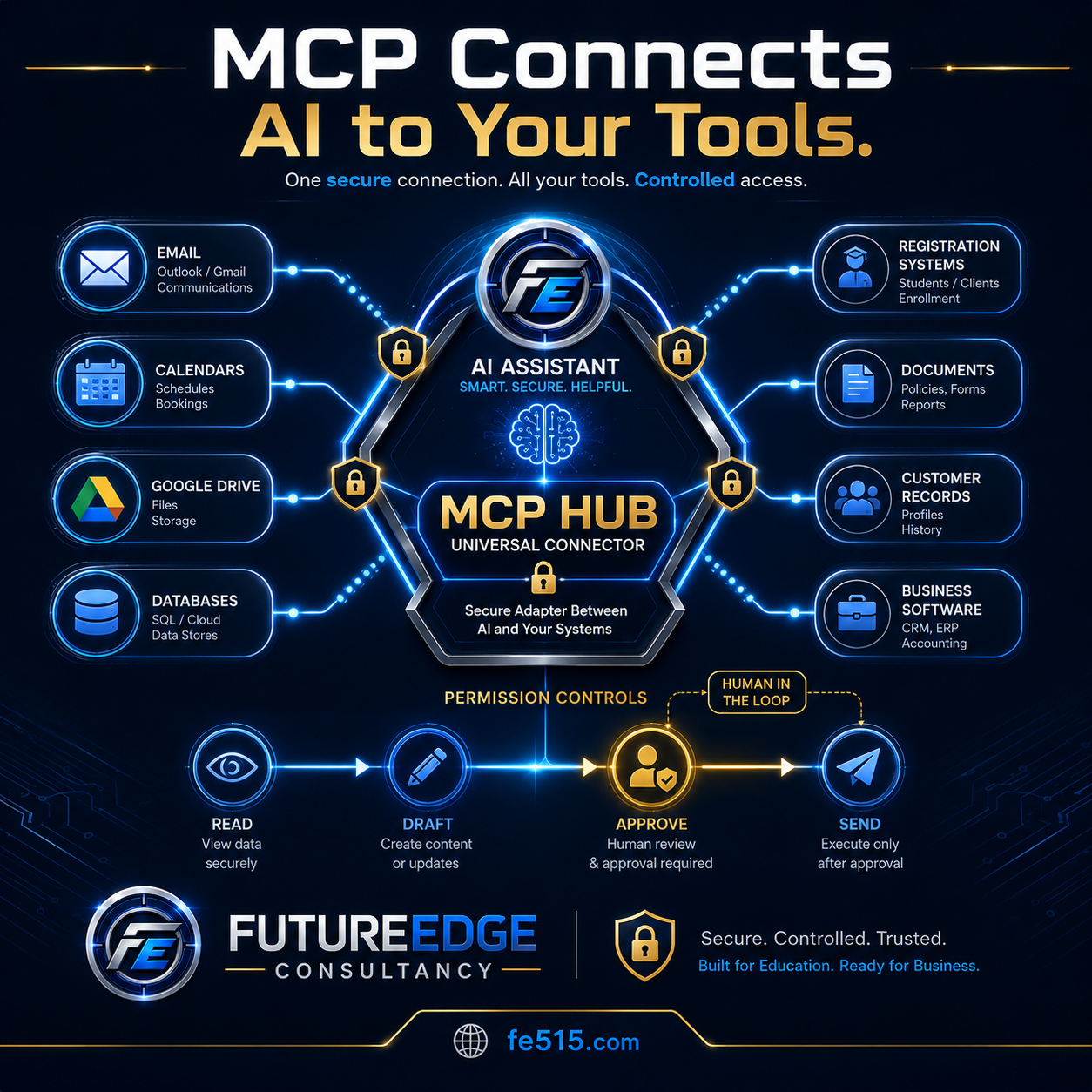
MCP acts like a universal adapter between AI and the tools an organization already uses.
What is MCP?
Model Context Protocol is a standard that helps AI applications communicate with outside systems.
Those systems might include:
Email
Calendars
Google Drive
Microsoft 365
Databases
Registration platforms
Customer records
Accounting software
Project-management systems
Document repositories
Internal business applications
Without a shared connection method, developers may need to build a separate custom integration for every AI model and every software platform.
MCP creates a more consistent structure for telling an AI system:
What tools are available
What information those tools can access
What actions they can perform
What permissions are required
When human approval is needed
MCP does not automatically make every connection secure. Organizations still need authentication, access controls, logging, testing, and thoughtful system design.
Why AI needs access to real tools
A chatbot can provide information, but it usually cannot complete a real organizational workflow by itself.
For example, a chatbot might help write an email.
A connected AI assistant could potentially:
Search the correct policy.
Review related records.
Check the employee’s calendar.
Draft the email.
create a follow-up task.
Present the proposed actions for approval.
Send the message only after a person authorizes it.
The value comes from connecting AI to the systems where work already happens.
How an MCP connection works
The basic process can be explained in four parts.
1. The AI receives a request
A user asks the AI assistant to complete a task.
For example:
“Find the classes beginning next week that have not reached minimum enrollment.”
2. The AI identifies the tools it needs
The assistant may need access to:
Registration data
Class schedules
Instructor agreements
Room reservations
Email
Calendar information
3. The AI uses approved tools
The system retrieves only the information it is permitted to access.
It may be allowed to read registration data and draft emails but not cancel a class or send messages without approval.
4. A person reviews sensitive actions
Before the AI changes records, sends communications, authorizes money, or makes a high-impact decision, the system pauses for human review.
This keeps the person responsible for the final action.
How schools can use MCP
Schools rely on many disconnected systems.
A district employee may use separate platforms for:
Student information
Email
Calendars
Board policies
Employee records
Facility reservations
Registration
Transportation
Athletics
Help-desk requests
Document storage
An AI assistant connected through controlled tools could help employees move information between those systems more efficiently.
School example: Community Education enrollment review
A Community Education manager could ask:
“Review next month’s classes and identify any that may need to be canceled or combined.”
The AI assistant could:
Read current enrollment numbers.
Compare enrollment with minimum class requirements.
Review instructor agreements.
Check available rooms and alternative dates.
Calculate the financial impact.
Draft instructor and participant messages.
Present cancellation or consolidation options.
Wait for manager approval.
Send approved messages.
Update the class status and calendar.
This is more than a chatbot response. It is a connected workflow involving several approved systems.
Other school applications
MCP-connected assistants could support:
Administrative meeting preparation
Policy and handbook research
Parent communication drafts
Facility scheduling
Athletic eligibility workflows
Employee onboarding
Help-desk requests
Student support documentation
Calendar coordination
Community program registration
Important educational decisions should still remain under human control.
How businesses can use MCP
Businesses also depend on many different systems.
An employee may need information from:
Customer relationship management software
Accounting
Contracts
Email
Calendars
Project-management tools
Inventory
Support tickets
Human resources
Document storage
MCP can help an AI assistant work across those systems through defined and controlled tools.
Business example: Customer meeting preparation
An employee could ask:
“Prepare me for tomorrow’s meeting with this customer.”
The AI assistant could:
Retrieve the customer profile.
Review recent emails.
Summarize open support issues.
Locate the current contract.
Review outstanding invoices.
Identify upcoming renewal dates.
Check the meeting time and attendees.
Create a briefing document.
Draft follow-up questions.
Wait for approval before sending anything.
The employee receives a useful briefing without manually searching several platforms.
Other business applications
MCP-connected systems could support:
Sales preparation
Customer-service workflows
Contract review
Invoice follow-up
Employee onboarding
Proposal development
Inventory checks
Meeting scheduling
Project updates
Compliance documentation
Permission controls are essential
The ability to connect AI to organizational tools creates significant responsibility.
An organization should clearly define what the AI can do.
A practical permission model might include four levels.
Read
The AI can view approved information.
Examples:
Read a policy
Review a calendar
Search a contract
View registration numbers
Retrieve a customer record
Draft
The AI can prepare content or proposed changes.
Examples:
Draft an email
Prepare a report
Create a calendar invitation
Suggest a database update
Prepare an invoice
Approve
A person reviews the proposed action.
Examples:
Approve an email
Confirm a refund
Review a schedule change
Authorize a record update
Approve a customer response
Send or execute
The system completes the action only after approval.
Examples:
Send the email
Update the calendar
Change a registration
Create the support ticket
Submit the approved record
This approach keeps people involved in actions that affect students, employees, customers, finances, or legal responsibilities.
What should always require human approval?
Organizations should consider requiring human approval before an AI system:
Sends external communication
Changes student or employee records
Approves or denies a request
Authorizes payment
Issues a refund
Cancels a class or event
Changes a contract
Makes an employment decision
Assigns discipline
Deletes records
Shares confidential information
The exact approval rules will depend on the organization and the level of risk.
MCP is not the same as full automation
MCP provides a way for AI to connect to tools, but it does not mean the AI should operate without oversight.
The goal should not be to give the AI unlimited access.
The goal should be to create useful connections with clear boundaries.
A well-designed system should know:
What information it can access
Which tools it can use
What actions are prohibited
When approval is required
How actions are logged
What happens when a tool fails
When the AI should stop and ask for help
Security considerations for MCP-connected systems
Any AI system connected to organizational tools should be designed with security in mind.
Important protections may include:
User authentication
Role-based access
Limited tool permissions
Secure credential storage
Data encryption
Audit logs
Approval checkpoints
Error handling
Activity monitoring
Regular evaluations
Separation of confidential data
Procedures for removing access
For example, a school principal may be permitted to view certain student records, while a Community Education employee may not.
A business manager may be allowed to review invoices but not change payroll.
The AI should receive only the access needed for the specific workflow.
Why audit logs matter
Organizations should be able to see what the AI system did.
A useful audit log may record:
Who initiated the request
Which tools were used
What information was retrieved
What the AI recommended
Who approved the action
What was changed
When the action occurred
Whether an error happened
This creates accountability and makes it easier to investigate problems.
How MCP works with AI agents
MCP and AI agents are closely related, but they are not the same thing.
An AI agent manages a multistep workflow.
MCP can provide the connections the agent uses to access tools and information.
A simple way to understand the difference is:
The agent decides what steps to take. MCP helps the agent communicate with approved systems.
For example, an agent may decide that it needs to search a policy, check a calendar, draft an email, and create a task.
MCP can provide consistent tool connections for those actions.
How MCP works with RAG
MCP can also connect AI systems to the locations where trusted documents are stored.
Those locations may include:
Google Drive
SharePoint
Internal databases
Policy repositories
Contract systems
Document-management platforms
RAG can retrieve the relevant information from those sources.
MCP can help provide access to the system containing the information.
Together, they can support AI responses grounded in current organizational documents.
How MCP connections should be tested
An MCP-connected system should be evaluated before people rely on it.
Testing should verify whether the AI:
Selects the correct tool
Retrieves the correct information
Respects user permissions
Avoids restricted records
Uses the right workflow
Pauses for human approval
Handles tool errors safely
Avoids sending incomplete drafts
Logs each action
Stops when information is missing
For example, a system should not send an email when it was only authorized to create a draft.
It should not retrieve confidential records for an unauthorized user.
It should not complete a sensitive action when the approval step fails.
Start with one controlled workflow
Organizations do not need to connect every system at once.
A better approach is to begin with one clearly defined workflow.
Choose a process that:
Happens regularly
Uses several information sources
Includes repeatable steps
Takes employees significant time
Has a clear approval point
Can be measured
Does not require unlimited system access
Examples might include:
Preparing meeting briefings
Drafting class cancellation notices
Reviewing incomplete registrations
Creating customer follow-up summaries
Preparing employee onboarding materials
Collecting information for a report
Once the workflow is tested and reliable, the organization can expand carefully.
Connect AI to your tools without giving up control
MCP can help schools and businesses move beyond isolated chatbots.
It provides a structure for connecting AI to email, calendars, documents, databases, registration systems, customer records, and other organizational software.
The most effective systems will not simply connect everything.
They will establish clear permissions, human approval steps, security controls, evaluation testing, and audit records.
The future of organizational AI will be connected, but it should also be controlled.
FutureEdge Consultancy helps schools and businesses explore secure AI connections, practical workflows, and human-centered automation.
Learn more at fe515.com.
